Why Do Games Use DAT Files?
Games use DAT files because the extension gives developers a flexible way to store many kinds of game data without committing to one public file format.
A game DAT file might contain textures, sounds, maps, configuration values, dialogue, indexes, saved state, animations, or several resource types bundled together. The exact contents depend on the game engine and how the developer designed its asset system.
Games use DAT files for organization, packaging, faster resource access, compression, and internal data management. The extension itself does not define the format. Each game can create its own DAT structure for the resources it needs.
DAT Is Useful Because It Is Generic
The biggest advantage of DAT is flexibility.
A developer can create an internal file format and give it a .dat extension without making users think it is a normal image, sound, spreadsheet, or document.
The game decides what the bytes mean.
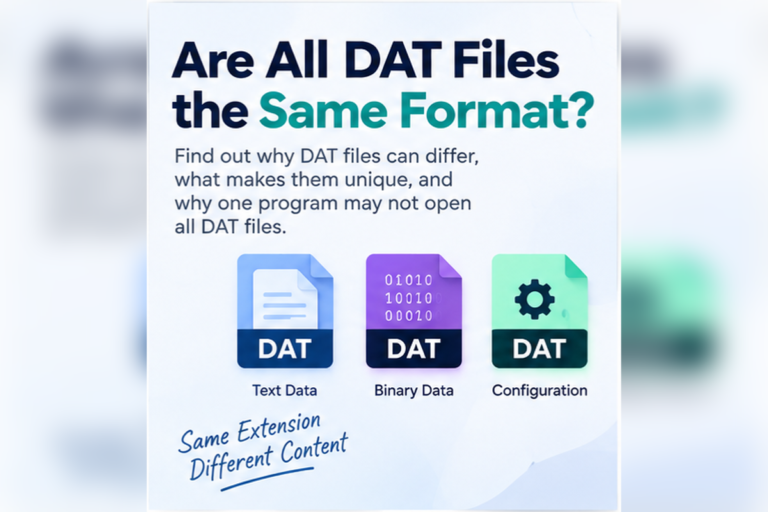
One DAT file may contain settings as readable text. Another may be a large binary archive containing hundreds of textures and sounds. A third may contain a database of player or world information.
This is why DAT files are not all the same format, even when they come from games.
How Game Assets Can End Up in a DAT File
During development, artists and designers may work with ordinary PNG, WAV, model, script, or animation files. Before release, build tools can convert those assets into formats that are faster or more convenient for the game engine.
The processed resources may then be bundled into one or more DAT files.
1. DAT Files Can Keep Thousands of Assets Organized
Modern games can contain a huge number of files.
A single project may have:
- Textures
- Icons
- Sound effects
- Music
- Voice dialogue
- Maps
- Animations
- Fonts
- Scripts
- Item definitions
Shipping every resource as a loose file can make the installation directory difficult to manage.
A game can instead group related resources into files such as:
Game.exe
config.dat
textures.dat
audio.dat
world.dat
localization.dat
save/
plugins/
This keeps the final installation more organized from the game’s point of view.
2. Games Can Use an Internal Resource Index
A DAT container often works together with an index.
The index tells the game where a particular resource starts and how large it is.
A simplified resource index might conceptually look like this:
ID    Resource             Offset      Size
001   player_texture       0x00001000  18432
002   menu_click           0x00005800   4096
003   intro_video          0x00006800  98211
004   map_forest           0x0001E7A3  65420
When the game needs the menu click sound, it can use the index to find the correct byte range rather than scanning the whole DAT file.
3. DAT Containers Can Reduce File-System Overhead
Opening thousands of separate files can involve repeated file-system operations.
A packed resource system lets the engine work with fewer large files and use an internal index to locate assets.
The performance benefit depends on the engine, operating system, storage hardware, caching strategy, and package design. Packing assets is not automatically faster in every situation, but it can make resource management more predictable.
4. Games Can Compress Resources Inside DAT Files
Games often need to reduce installation size.
A developer can compress some or all resources before storing them in a DAT container.
For example, an internal entry might describe:
asset=dialogue_0042
offset=0x02A84000
compressed_size=18420
original_size=45128
compression=custom_codec
The game reads the compressed resource and expands it when needed.
This also explains why you may search a game DAT file for a known image or sound signature and find nothing. The resource may be compressed inside the container.
5. DAT Files Can Store Several Resource Types Together
Some game DAT files contain one main resource type. Others are mixed containers.
May identify the package version, record count, or internal format.
Can map resource IDs or names to byte offsets and lengths.
May contain UI graphics, character textures, icons, or environment assets.
Could include voices, music, ambient sounds, and effects.
May include object definitions, maps, scripts, tables, or other binary records.
A DAT file that contains images does not have to be an image file. A DAT file containing audio does not have to be one playable music track.
For those specific cases, see Can a DAT File Contain Images? and Can a DAT File Contain Audio?.
6. DAT Files Can Hide Implementation Details From Normal Users
Game resources are usually intended for the engine, not for direct manual editing.
Using an internal container helps the developer control how assets are loaded and updated. It also discourages accidental edits to files that need an exact structure.
This does not mean every game DAT file is encrypted or designed as copy protection.
A DAT file may simply be a convenient internal package.
7. DAT Files Can Simplify Updates and Patches
Games need a way to update resources after release.
An asset package system can help developers organize which parts of the installation belong together.
Depending on the engine, an update may replace a package, add a new package, or patch sections of existing data.
Again, DAT itself does not define the update method. The game’s packaging system does.
What Kinds of Game Data Can a DAT File Hold?
| Game data | What might be stored | Typical viewing challenge |
|---|---|---|
| Textures | Characters, terrain, UI images | May use custom texture formats |
| Audio | Voices, music, sound effects | May be compressed or indexed |
| Video | Intros, cutscenes, background clips | May be embedded in a larger container |
| Maps | Terrain, object locations, level data | Usually requires game-specific structure |
| Configuration | Settings, object values, rules | May be readable text or binary |
| Localization | Dialogue and translated text | May use IDs, encodings, or compressed strings |
Why Are Some Game DAT Files Readable?
Not every game DAT file is a binary resource archive.
A game may use a DAT file for simple settings or data tables.
For example:
id|name|damage|value
101|Iron Sword|12|75
102|Steel Sword|18|140
103|Battle Axe|24|220
Another file from the same game may be completely binary.
This is why you should inspect each DAT file rather than assume all files from one game use the same structure.
Why Do Game DAT Files Show Strange Characters?
Game DAT files often contain binary data.
If you open binary resources in Notepad, the text editor tries to turn each byte into a character. The result can look like random symbols.
That does not mean the file is corrupted.
A hex view is more useful for binary inspection because it shows the actual bytes.
If you need help confirming the type, read How to Tell Whether a DAT File Is Text or Binary.
Can You Find Images Inside a Game DAT File?
Sometimes.
If standard PNG, JPEG, BMP, or other image data is stored directly inside the file, a hex viewer may reveal known signatures.
However, many games convert textures into engine-specific formats or compress them before packaging.
In that case, there may be no normal PNG or JPEG signature to find.
See How to View Image Data Stored Inside a DAT File for a deeper look at image signatures and raw graphics data.
Can Game DAT Files Contain Music and Sound Effects?
Yes.
Audio DAT files may store complete sound streams or many individual resources.
You could find readable labels such as:
music_menu
voice_player_001
enemy_alert
weapon_fire_03
ambient_forest
ui_confirm
Changing the DAT extension to MP3 or WAV does not convert those resources into playable audio.
Can Game DAT Files Contain Video?
Yes. Some games bundle intro movies, cutscenes, tutorial videos, or other media inside their asset packages.
The video may be stored as a standard stream or in a game-specific format.
Read Can a DAT File Contain Video? for more information about DAT video data.
Why Not Just Use ZIP Files?
A game developer could use a standard archive format, but there are reasons to create a custom package.
A custom format can be designed around the engine’s needs.
For example, it may support:
- Special indexing
- Per-resource compression
- Fast lookup by numeric ID
- Custom metadata
- Streaming large resources
- Game-specific patching
A DAT container is not automatically better than ZIP. It is simply one possible design choice.
Can You Open a Game DAT File?
You can usually inspect it, but fully opening it depends on the format.
Readable DAT
Use a text or table view when the file contains settings or structured records.
Unknown resource file
Use hexadecimal view to look for headers, strings, and repeated patterns.
Proprietary package
Look for documentation or tools made specifically for that game’s file format.
Your DAT File Viewer can help with the first inspection step by showing text, table-style data, search results, and a hexadecimal preview.
Can You Edit a Game DAT File?
Sometimes, but direct editing can break the file.
Game DAT containers may use:
- Offsets
- File-size fields
- Indexes
- Checksums
- Compression
- Internal references
If you insert or remove bytes without updating the supporting structure, the game may no longer be able to read the package.
Are Game DAT Files the Same Across Different Games?
No.
Two games can both use .dat and have completely unrelated internal formats.
Even games from the same studio can use different DAT structures across engines or versions.
This makes the game’s name, version, and source folder important when you are trying to identify a file.
If the creator is unclear, see How to Find Out What Created a DAT File.
Which Approach Should You Use?
Why Game DAT Files Can Be Difficult to Understand
A general viewer can show you bytes and readable strings, but a proprietary DAT file may depend on rules that exist only inside the game engine.
You may need to know:
- Header layout
- Asset IDs
- Resource offsets
- Compression algorithms
- Texture formats
- Audio codecs
- Encryption or obfuscation rules
Without that information, you can inspect the file but may not be able to reconstruct every resource correctly.
Found a DAT File Inside a Game Folder?
Check whether it contains readable settings, table data, resource names, or binary bytes before deciding whether you need a game-specific extractor.
Inspect Your DAT FileFrequently Asked Questions
Why do video games use DAT files?
Games use DAT files to store and organize internal data such as textures, audio, maps, configuration, videos, and other resources. The exact structure is defined by the game.
Are game DAT files archives?
Some are. A game DAT file may act as a resource archive containing many assets, but other DAT files may contain only settings or records.
Can a game DAT file contain images?
Yes. It can contain textures, icons, menus, or other graphics, either as standard images or proprietary texture data.
Can a game DAT file contain audio?
Yes. Game DAT files can store music, sound effects, dialogue, and other audio resources.
Why does a game DAT file look like gibberish?
It is probably binary. Opening binary data in a text editor produces strange characters because the bytes were not designed to be displayed as text.
Can I rename a game DAT file to ZIP?
Renaming does not convert the format. It will only behave like ZIP if the file was already a compatible ZIP archive internally.
Can I edit a DAT file to modify a game?
Possibly, but only if the format is understood. Proprietary packages may use indexes, offsets, compression, and checksums that must remain valid.
DAT Files Give Games a Flexible Way to Package Data
Games use DAT files because they can define the internal structure around their own needs.
A DAT file can group resources, simplify asset organization, support indexing, store compressed content, and provide a predictable package for the engine to read.
The important point is that DAT does not define one game-resource format. Every game can use it differently.
If you find a DAT file in a game directory, start by identifying whether it is readable text or binary. Search for asset names. Inspect the hex data. Then use a game-specific tool if you need to extract or modify proprietary resources.
You can open your DAT file online to inspect its text, table, search, and hex views before choosing the next tool.